


Super Productivity
Free, open source task manager with a daily plan, built-in time tracking, timeboxing and focus mode. Works offline, needs no account and keeps data on your device.
Verified
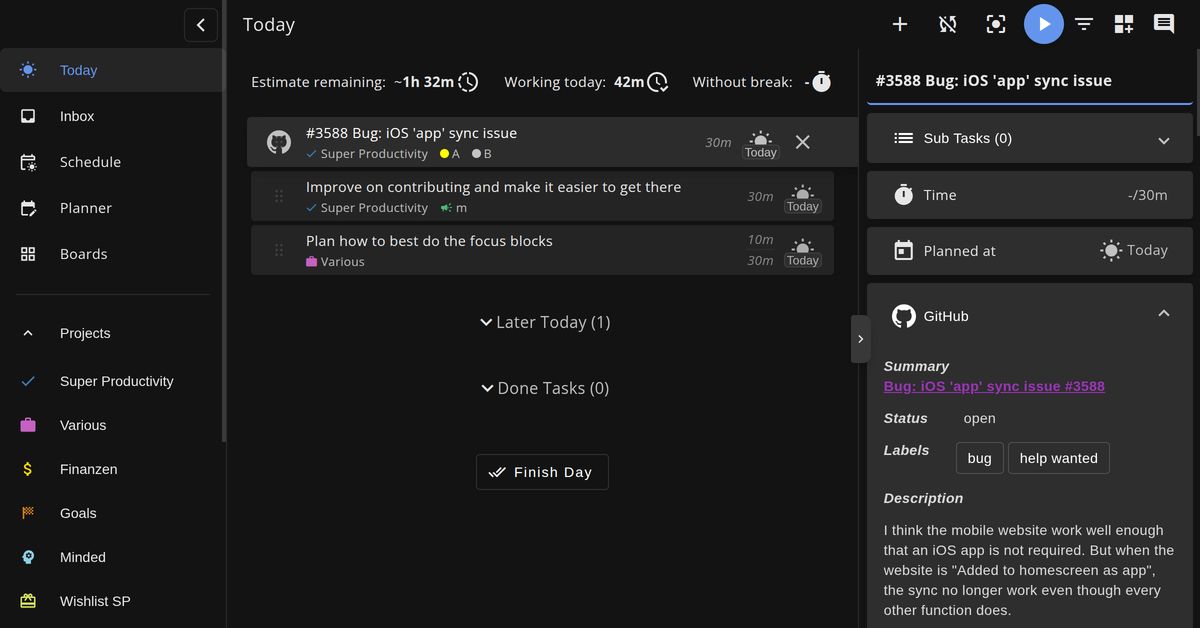
About Super Productivity
Super Productivity is a free open source task manager built for planning a day's work. Tasks can be arranged as lists, Kanban boards or an Eisenhower Matrix, then estimated, scheduled and tracked. The app runs on Windows, macOS, Linux, Android and iOS, and it is also available in the browser.
Time tracking starts from the task itself and produces timesheets and reports. A focus mode and Pomodoro timer support deep work sessions, and calendar integration allows tasks to be timeboxed into a realistic day. Subtasks, notes, tags, projects and repeating tasks keep the details of each piece of work together.
Keyboard shortcuts let users capture an idea or switch tasks without leaving the keyboard. Issues from GitHub, GitLab and Jira can be brought into the daily plan, so the tools for development work stay close to the to-do list. Plugins extend the workflow, and optional sync through Super Sync, WebDAV or Dropbox keeps devices aligned. Sync is only used when chosen, and the app works offline without an account.
The app suits developers who track work across several issue trackers, freelancers who need to see where billable hours go, and people with ADHD who benefit from a little structure. Privacy is a central goal: tasks stay on the device by default, data can be exported at any time, and the project is MIT licensed, which allows commercial use. The software has no premium tiers, and support is available through GitHub and community channels.
Key features of Super Productivity
- Daily planning
- Tasks are estimated and scheduled into a plan for the day.
- Time tracking
- Work is tracked against each task and turned into timesheets and reports.
- Focus mode and Pomodoro
- A single-task view and a Pomodoro timer support deep work.
- Timeboxing
- Calendar integration lets tasks be scheduled into specific blocks of time.
- Keyboard shortcuts
- Common actions and task switching are available from the keyboard.
- Issue tracker integrations
- Issues from GitHub, GitLab and Jira appear alongside personal tasks.
- Plugins and sync
- Plugins extend the workflow, and optional sync covers multiple devices.
What Super Productivity is used for
- Turning a backlog of tasks into a daily plan with time estimates
- Tracking time on client work and producing a timesheet
- Pulling GitHub or Jira issues into a personal to-do view
- Working offline on a laptop without creating an account
Who it suits
- Developers who juggle issues from several trackers
- Freelancers who bill by the hour
- People with ADHD who want light structure in their day
Super Productivity pros and cons
Strengths
- Free, with every feature and platform included
- Data stays on the device by default and can be exported
- Works offline without an account
- MIT license permits commercial use
Limitations
- Sync and integrations need to be set up separately if they are wanted
Editorial summary based on the product's official information.
Alternatives to Super Productivity
The closest matches by category, features and platforms.
 Open sourceOpen source
VikunjaProductivity
Vikunja is open-source task management that you can self-host or use as a hosted service, with list, Kanban, Gantt and table views for the same tasks.
TodoistProductivity
Todoist is a task manager and to-do list app that captures tasks in natural language and organises them into views, calendars and shared team projects.
Frequently asked questions about Super Productivity
Is Super Productivity really free?
Yes. All features and platforms are free under the MIT License, with no premium tiers or paid features.
Does the app collect my data?
Tasks and tracking data stay on the device unless a sync target is connected. The app does not run analytics or require a login.
Can I use it at work?
Yes. The MIT License allows commercial use, including modifying the code or building on it.
What are the best alternatives to Super Productivity?
The top-ranked alternatives to Super Productivity are Vikunja and Todoist.
What kind of software is Super Productivity?
Super Productivity is listed under Productivity. Free, open source task manager with a daily plan, built-in time tracking, timeboxing and focus mode. Works offline, needs no account and keeps data on your device.
Reviews
Used Super Productivity? Share what worked and what didn't to help others decide.
Super Productivity is an alternative to
TodoistProductivity
Todoist is a task manager and to-do list app that captures tasks in natural language and organises them into views, calendars and shared team projects.
- Open sourceOpen source
VikunjaProductivity
Vikunja is open-source task management that you can self-host or use as a hosted service, with list, Kanban, Gantt and table views for the same tasks.
Similar software
- Free planFree plan
NovastartProductivity
Novastart is an infinite canvas OS where apps, shared canvases and AI agents live on one whiteboard. Novastart is The Infinite Canvas Whiteboard OS, an operating system built around one endless, z…
 Free planWindowsFree plan
RaycastProductivity
Raycast is a launcher for macOS and Windows with built-in productivity tools, an extension store, snippets, quicklinks and AI chat.

Microsoft 365 CopilotProductivity
Microsoft 365 Copilot is an AI assistant built into Microsoft 365 apps such as Word, Excel, PowerPoint, Outlook and Teams to help with everyday work.

FormbricksProductivity
Open source survey and experience management platform for in-app, website and email surveys, with self-hosting, GDPR-focused cloud hosting and audience targeting.

FormsortProductivity
Formsort is a low-code form builder for high-conversion forms, with conditional logic, split testing, partial responses and HIPAA-compliant healthcare templates.
 Free planWebFree plan
CodaProductivity
Coda is an all‑in‑one collaborative workspace that combines docs, tables, apps, and AI to organize work, automate tasks, and help teams move faster.